

 Flooring Document Management Software
Flooring Document Management Software That Finds Any File in Seconds
A flooring showroom generates a significant amount of paperwork. Contracts, signed quotes, product specifications, installation work orders, warranty documents, invoices, supplier agreements. It adds up quickly across dozens of active projects and customers.
When those documents live in filing cabinets, email attachments, and desktop folders, finding the right file at the right moment becomes a task in itself. An installer needs the floor plan for a job starting in an hour. A customer disputes a quote detail agreed three weeks ago. A supplier query requires the original purchase order. Each search eats time that should be spent on more productive work.
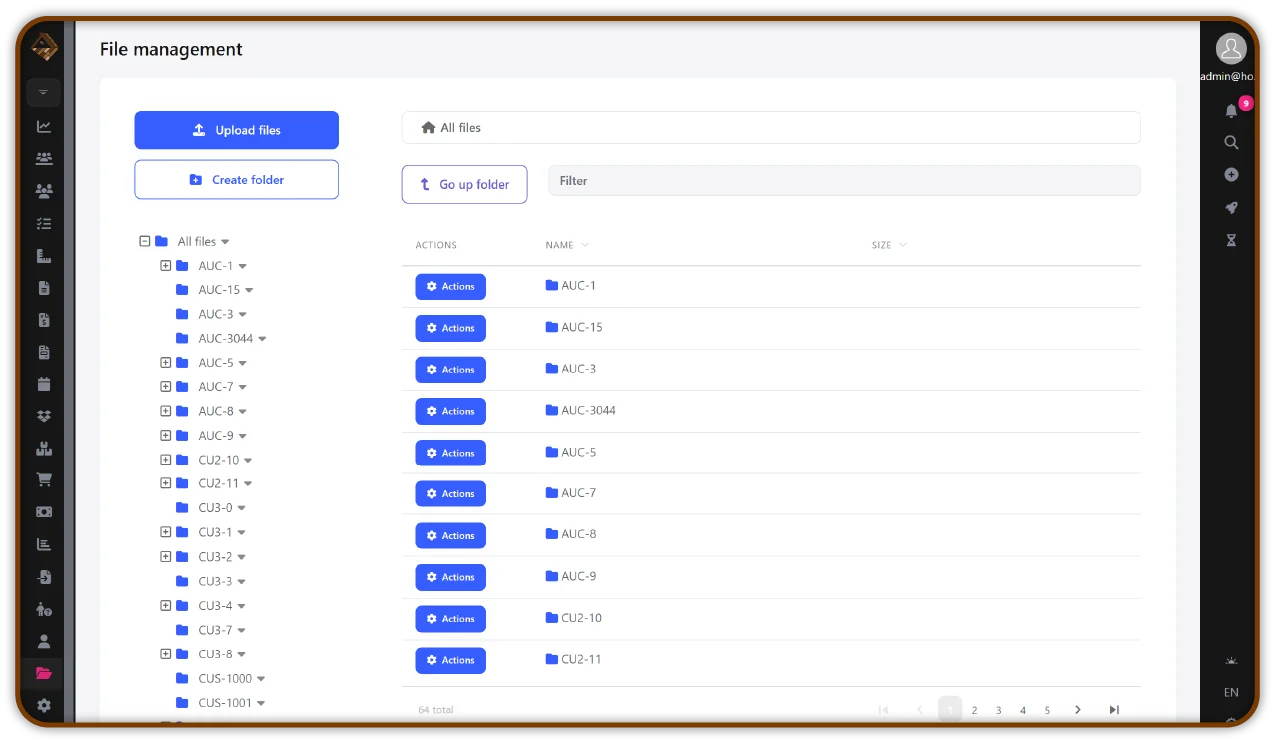
HomeArize's flooring document management software gives retailers a secure, organized system for storing and accessing every business document, connected to the right client, project, or work order, and accessible from any device at any time.
Organized, Secure, and Always Accessible
HomeArize replaces the filing cabinet with a smarter digital document system that keeps every file connected to the job it belongs to, protected from loss, and easy to find when you need it. For flooring showrooms that deal with a high volume of customer and project documentation, this means your team spends less time searching and more time serving. Every document is stored in the right place the first time, linked to the relevant customer record or job, and retrievable in a few clicks from any device, whether someone's in the showroom, in the office, or out on a job site.
Flooring Contract Management, Not Just Contract Storage
Storing a signed contract is only useful if you can also tell what's happening with it. Has the customer signed yet? Is a warranty agreement about to expire? Did the supplier confirm the terms on that purchase agreement, or is it still pending? Filed away in a folder, a contract answers none of that without someone opening it and checking manually.
HomeArize's flooring contract management keeps status visible alongside storage. Contracts, warranty agreements, and supplier terms are tracked by where they stand, not just where they're saved, so your team can see what still needs a signature, what's active, and what's coming up for renewal without digging through files one at a time. That distinction matters most during a dispute or a warranty claim, when knowing a contract exists is worth far less than knowing exactly what it says and whether it's still in effect.
What Flooring Document Management Software Does for Your Business

Go Fully Paperless
Store contracts, quotes, invoices, work orders, and product specifications digitally. No more physical filing, no lost paperwork, and no time wasted searching through folders. HomeArize's paperless office tools mean every document lives where it should and is accessible in seconds.


Secure Cloud-Based File Storage
HomeArize keeps your documents protected with encryption and secure backups. Important files including signed contracts, client agreements, and project records cannot be accidentally deleted, damaged, or misplaced. Your business data stays safe and always recoverable.

Organized by Client, Project, or Document Type
Structure your document library the way your business works. Find files by customer name, job number, or document category, whether you need a quote from last month or a warranty certificate from last year. Everything is there in a few clicks.

Linked to Jobs and Work Orders
HomeArize connects documents directly to the relevant customer profile, job record, or invoice. Your installers, project managers, and showroom team all have the right documents at their fingertips, reducing miscommunication and the back-and-forth that slows projects down.

Accessible from Any Device
Whether your team is on the showroom floor, in a customer's home, or coordinating from the office, HomeArize gives everyone access to the files they need from any phone, tablet, or desktop, with no printing required.

Reduced Admin for Your Whole Team
When documents are filed digitally the moment they're created or received, there's no catch-up admin at the end of the week. Records stay current, files stay organized, and your team can focus on customers rather than paperwork.
What Going Paperless Actually Changes in Your Showroom
When your documents are digital and properly organized, everyday tasks become noticeably faster and the overall quality of your service improves.

Faster Customer Responses
Responding to a customer query about their order, their quote, or their warranty takes seconds rather than minutes when the file is already in the system and searchable.Smoother Installations
Preparing for a site visit means pulling up the job file on a phone, not printing documents the night before. Your installers arrive with everything they need already in hand.
More Professional Client Experience
Quick document access, clean records, and organized communication make your showroom feel more trustworthy and reliable, the kind of experience that drives repeat purchases and referrals.Cleaner End-of-Period Admin
Month-end and year-end become significantly easier when your documents, and your contract statuses, are already organized digitally, with records linked to the right jobs and ready for your accountant without extra preparation.Ready to Eliminate the Paper Chaos?
Frequently Asked Questions
What is flooring document management software?
Flooring document management software stores and organizes business documents such as contracts, quotes, work orders, and warranty files digitally, connected to the right customer or job instead of scattered across filing cabinets and email. HomeArize keeps every file searchable and accessible from any device.
How is flooring digital document software different from basic cloud storage?
Flooring digital document software connects each file to the specific job, customer, or work order it belongs to, rather than storing files in a generic folder structure. HomeArize links documents directly to job records, so finding a file means searching by customer or project instead of hunting through unrelated folders.
What does flooring contract management software actually track?
Flooring contract management software tracks the status of a contract, whether it's signed, pending, active, or approaching renewal, not just where the document is stored. HomeArize keeps that status visible alongside the file itself, so your team knows what a contract says and whether it's still in effect without opening it manually.
What is flooring file management software used for?
Flooring file management software organizes business documents by customer, job, or document type so they can be found quickly, replacing folders and filing cabinets with a structured, searchable system. HomeArize applies this structure automatically as documents are added.
What does going paperless mean for a flooring business specifically?
Going paperless for a flooring business means contracts, quotes, work orders, and warranty documents exist digitally and are accessible from any device, instead of relying on printed files and physical filing cabinets. HomeArize supports this across showroom, office, and job site use.
Is flooring file storage software secure enough for sensitive customer documents?
Reputable flooring file storage software uses encryption and automated backups to protect documents from loss or unauthorized access. HomeArize secures signed contracts, client agreements, and project records against accidental deletion or damage.