

 Commercial Flooring Software
 for Estimates, Projects, and Billing
Run Commercial Flooring Projects From Estimate to Installation to Invoice
HomeArize is cloud-based commercial flooring software that helps contractors and flooring companies manage estimates, project information, installation teams, and billing from one platform. Import existing estimates, track work in progress across job sites, and bill progressively as each project moves forward. Your office and your installation crews work from the same project information.
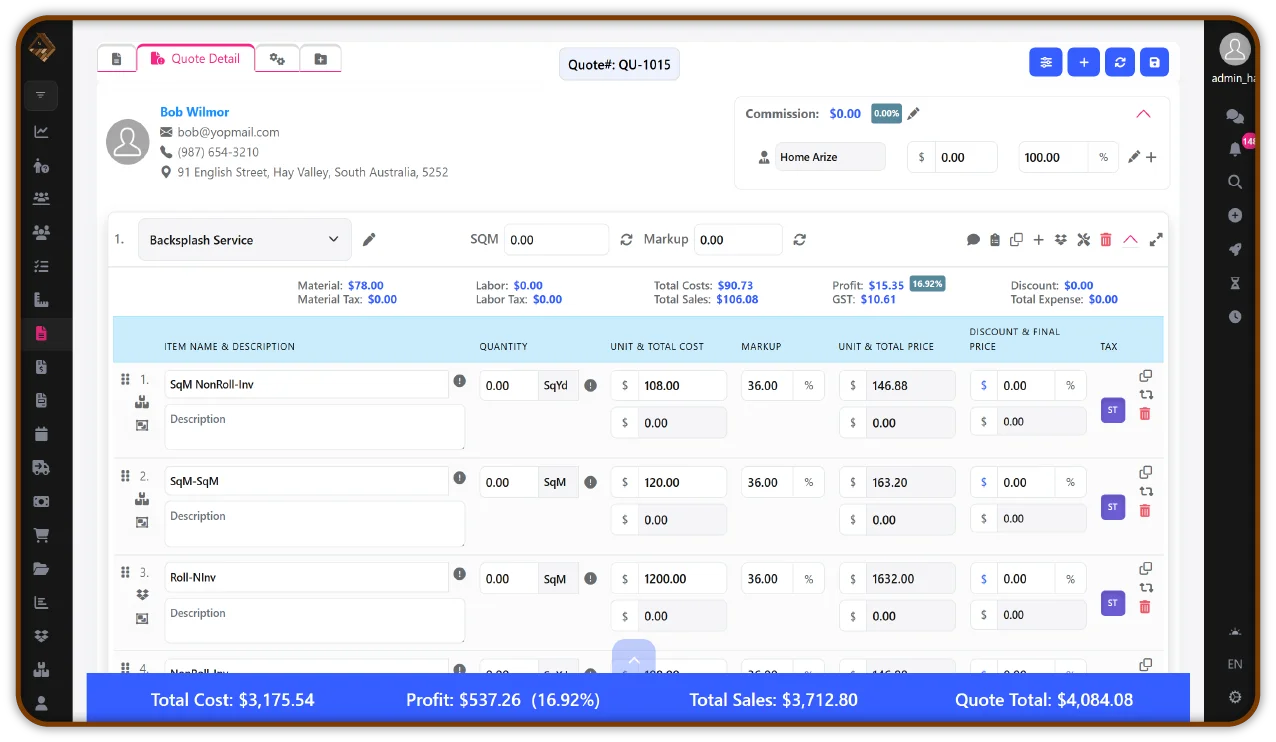
Commercial Flooring Software Built for Real Project Requirements
A quoting feature or a customer list does not run a commercial project. Commercial flooring companies manage several projects at once, each with its own estimate, job site, installation crew, schedule, and billing. When that information sits in separate spreadsheets, inboxes, and accounting records, the office spends its time collecting updates instead of managing work.
Software to manage commercial flooring projects has to hold all of it together: the estimates you prepare or import, the status of each project, the progress of work on site, and the invoices that follow. That is the job of commercial flooring project management software, and it is what HomeArize is built to do.
HomeArize is cloud-based flooring management software built for flooring businesses. Estimates, projects, installation teams, inventory, purchase orders, invoices, and payments stay in one centralized platform. For commercial work, that makes it practical commercial flooring management software rather than a general quoting or customer management system.
Common Challenges in Managing Commercial Flooring Projects
Commercial projects are larger and last longer than most residential jobs, and the same four problems tend to appear as a company takes on more of them.

Disorganized Estimates and Project Information
Estimates prepared in one place and projects tracked in another force teams to re-enter numbers and chase the original figures.
Why it matters: When the estimate and the project drift apart, nobody is sure what was actually bid.


Limited Visibility Into Active Projects
Without one view of every active project, managers rely on phone calls and status meetings to learn where jobs stand.
Why it matters: Problems on one site stay hidden until they affect the schedule or the invoice.

Installation Team and Job Site Coordination
Crews, schedules, and job details change often across several sites.
Why it matters: When the office and the field work from different information, crews arrive unprepared and time is lost.

Complex Project Billing and Payroll Administration
Longer projects are billed in stages, and some require certified payroll documentation.
Why it matters: Scattered billing and payroll records make project administration slow and harder to review.
Commercial Flooring Software for Different Business Types
Commercial flooring work is carried out by several kinds of businesses, and each needs something different from its software. HomeArize supports these operations in one platform.

Commercial flooring contractors
As commercial flooring contractor software, HomeArize keeps the estimate, the project, the crews, and the billing connected. Contractors can import existing estimates, monitor active projects from the dashboard, and bill progressively as work advances. It is software for commercial flooring contractors who manage several projects at once and need one place to see them.

Flooring installation companies
Installation companies depend on getting the right crew to the right site with the right information. With scheduling and job details available from any device, HomeArize works as software for managing commercial flooring installation teams across several job sites.

Commercial flooring retailers and dealers
Dealers that sell to commercial customers often run retail and project work side by side. HomeArize keeps estimates, inventory, purchase orders, and project records together, so commercial accounts are managed alongside showroom sales instead of in a separate system.

Flooring subcontractors
Subcontractors work to another company's schedule while still carrying their own estimates, crews, and billing for each project. HomeArize keeps that information organized per project, so the office and the crews stay aligned on what is bid, scheduled, and billed.

Multi-location flooring businesses
When projects, customers, and stock are spread across locations, consistent records matter more. HomeArize keeps customer, inventory, and project information in one platform, so each location works from the same records.
Features That Help Manage Commercial Flooring Projects
These five features cover how commercial projects are estimated, tracked, and billed. They work alongside the rest of the HomeArize platform.
Commercial Flooring Estimating Software
Commercial bids start with accurate quantities. HomeArize's flooring estimating software handles takeoffs and material calculations, including waste allowances, so commercial flooring estimates are built from consistent numbers instead of separate spreadsheets. Labor is itemized separately from materials, which makes larger bids easier to review. The estimate then carries into the project that follows, which is where estimate importing fits.
1. Estimate Importing
Bring existing estimates into HomeArize instead of re-entering them.
Commercial estimates are often prepared before a project reaches your project list. Estimate importing lets you bring existing estimate information into HomeArize, so the figures your team already prepared carry into the project. That keeps the estimate connected to the project, cuts repetitive data entry, and keeps estimate details organized with each job. For contractors handling several commercial projects at once, the office and the field work from one set of figures.
2. Project Management Dashboard
See every active project in one place.
The project management dashboard gives commercial flooring teams a central view of their projects. Project information and status sit together, so managers can monitor several ongoing projects and open any one of them to see its details. It replaces collecting updates by phone and spreadsheet, and it helps the office, project managers, and installation crews coordinate around the same information.
3. Work-in-Progress (WIP) Management
Know what is finished and what is still open.
WIP management helps you monitor active commercial projects as they move forward. Track progress, see completed and pending work, and manage active work across multiple job sites. Larger commercial projects often run for weeks or months and cover several areas, so WIP visibility keeps office and installation teams working from the same picture of each job.

4. Progressive Billing
Bill as projects progress.
Commercial projects are rarely billed in one invoice at the end. Progressive billing lets you organize billing throughout a project's lifecycle, based on project progress or agreed milestones. Invoices and payments for each ongoing project stay visible, so the office can see what has been billed, what has been paid, and what is outstanding. That gives clearer financial visibility and keeps administration organized on larger or longer jobs.
5. Certified Payroll Import
Keep payroll information with the project.
Some commercial projects require certified payroll or prevailing wage documentation. Certified payroll import lets you bring certified payroll information into HomeArize, so payroll-related project information is organized with the project and easier to access when the office needs it. It supports the administrative side of these projects. Your team remains responsible for meeting certified payroll requirements; HomeArize helps keep the related information organized.
6. Order Management
Keep material orders organized across projects.
Order management helps commercial flooring contractors organize material orders for each project. Track the materials ordered, quantities, suppliers, and purchase order details in one place. This makes it easier for office teams and project managers to coordinate material purchasing, monitor order requirements, and keep project-related purchasing information organized. For contractors managing multiple commercial jobs, it provides better visibility into material procurement and helps keep projects on track.
Supporting Features for Commercial Projects
Installation scheduling and installer coordination
Inventory management

Purchase order management
Invoicing and payment tracking
Digital documentation
Multi-location management
How HomeArize Helps Organize Commercial Flooring Operations
A commercial project moves through four stages: estimate, project setup, installation, and billing. Problems start where one stage hands off to the next. HomeArize carries the same project information through all four.
Centralized Project Information

Better Estimate-to-Project Continuity
Improved Job Site Visibility
Installation Team Coordination
Work-in-Progress Tracking

Organized Billing and Payment Records
Why Commercial Flooring Businesses Choose HomeArize

Better Project Visibility
Centralized project information and WIP management show which projects are active, how far along they are, and what remains. Managers spend less time asking for updates and more time acting on them.

More Organized Commercial Flooring Operations
Commercial flooring business software works best when estimates, projects, crews, and billing share one record. HomeArize brings estimating, project management, installation coordination, and business records into one cloud-based platform.

Greater Control Over Project Billing
Progressive billing and payment tracking give a clearer view of what has been billed and what is outstanding on each commercial project, which makes project finances easier to review.
Get StartedManage Commercial Flooring Projects with Greater Control
Commercial flooring projects involve more estimates, more crews, and more paperwork than most companies planned for. HomeArize organizes that work in one platform, from the first estimate through installation and billing, so your office and your installation teams work from the same project information.
See how estimate importing, the project management dashboard, work-in-progress management, progressive billing, and certified payroll import work together for your business.
FAQFrequently Asked Questions
What is commercial flooring software?
Commercial flooring software helps flooring contractors, installers, and dealers manage commercial projects in one system, from estimates and project tracking to installation scheduling, inventory, and billing. Unlike basic quoting or customer management software, it is built around larger, longer projects with several job sites and staged invoicing. HomeArize is cloud-based flooring management software that covers these needs.